A homelab is a personal and self-managed server environment that one can use for self-hosting, experimentation and learning. It can start with something as simple as running a webserver on mobile devices, or scale up to setting up entire racks full of individual PC nodes.
I have a laptop which I use as my daily driver and for personal projects, and a desktop PC dedicated to gaming. Both of them had good compute configurations, but due to their own objectives, it did not make sense for me to tinker around with them for the homelab.
Finding the right Homelab system
My initial plan was to get Raspberry Pi 5 which has been quite popular for setting up these small projects and hacking. It comes with a powerful ARM-based processor and draws as little as 10-20W of power, which is great when it comes to power efficiency per compute. Considering the recent hike in electronics, especially RAM and storage, the Pi 5 retail price is about ₹34,449 ($360). At this pricing, we can get a laptop which offers better compute, making this option not feasible. It is still great if you need the GPIO, small form factor, and power efficiency for your use-case.
This actually led me to look for the next tier of devices in this category but smaller than actual PCs, which are Mini PCs. These are small form factor PCs that come with the power of a desktop PC at a size smaller/closer to laptop units. Some of these provide upgrade options allowing you to increase RAM, HDD, SSD and connect PCIe devices.
AOOSTAR GEM12 MAX Mini PC
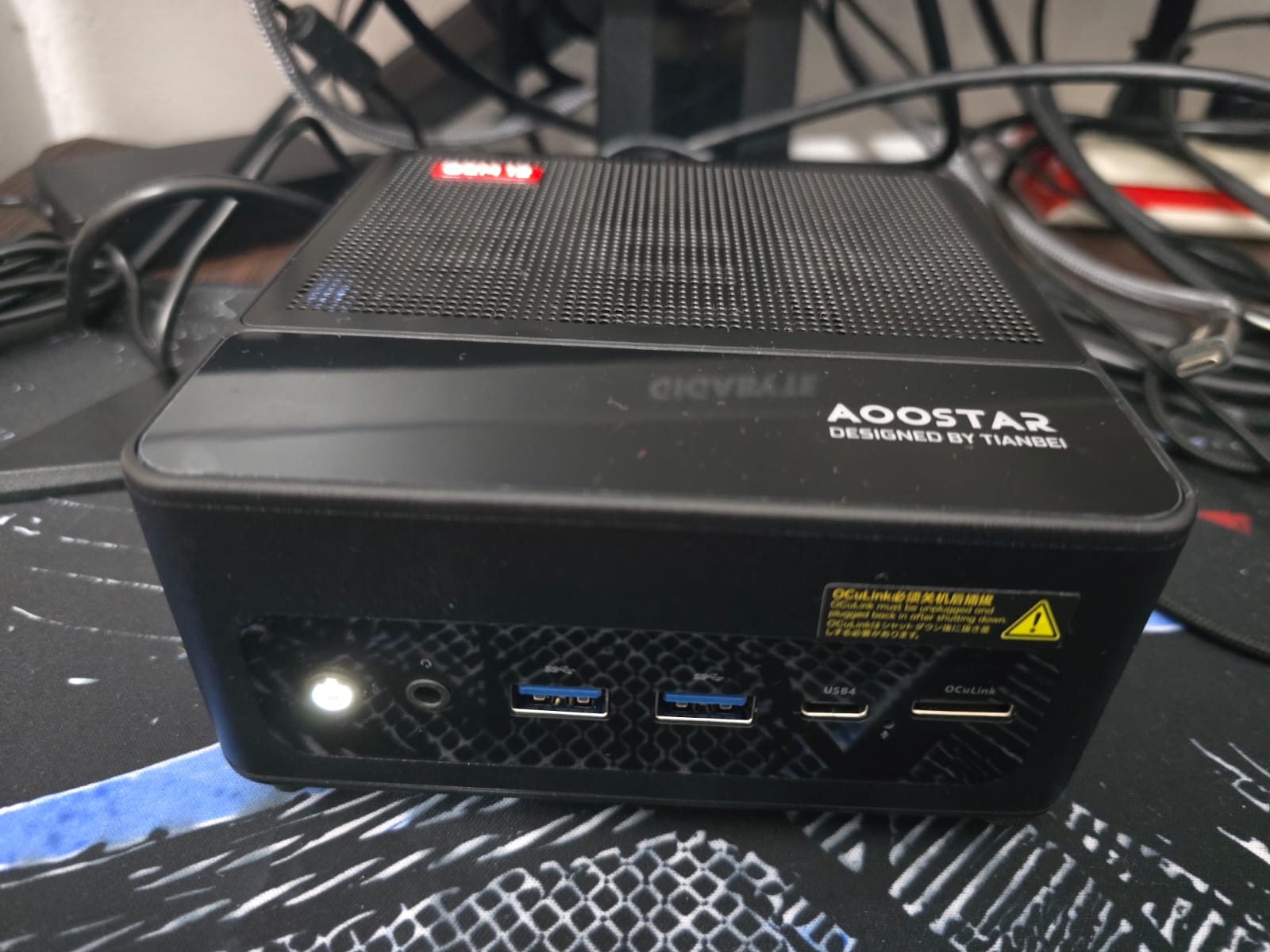
I purchased AOOSTAR GEM12 MAX Mini PC as my first Mini PC system. Unfortunately it was not something sold in India, so I had to get it imported. Desertcart has been a great experience, which surprisingly also had a smooth experience from purchasing to getting live updates. It took me just 10-12 days to get my hands on the system.
Configuration:
- CPU: Ryzen 7 8745HS (8C/16T, 3.8 GHz - 5.1 GHz)
- GPU: Integrated Radeon 780M
- RAM Capacity: Dual-channel DDR5 5600MHz (Expandable to 128GB)
- SSD Capacity: Dual-channel M.2 2280 PCIe4.0x4 SSD (Expandable to 8 TB)
- Power: 45W-70W
The configuration I went with was the barebone that did not come with RAM and SSD. So I ordered 1x Corsair Vengeance DDR5 16GB DDR5-4800Mhz and WD Blue SN5100 1TB for the machine. I still have one slot left for each component if I were to choose to upgrade the compute in the future (hopefully compute price drops).
Another reason for purchasing this specific Mini PC is that it comes with a great number of ports including USB 4, and an OCulink port for connecting external PCIe devices. This makes it great to connect external GPUs to the Mini PC, making it further extensible with options that you normally wouldn't find. This is for the future, when I get an option for a high VRAM GPU card through which I can extend this Mini PC for running Local LLMs.
My Software Stack
Bazzite (OS)
I came across Bazzite while looking for an OS that makes it easy for gaming on Linux. Most of the time, you will need to personally install and handle Linux driver software for your respective GPUs and then a software application to run Windows games. It is built on Fedora Atomic Desktop, where the core system is read-only (immutable). Any modification has to be done using certain tools and commands that write user config, modifications and executables into the user directory.
My personal experience with using this has been flawless: drivers all packed into the kernel, podman to easily run container apps, and pre-bundled game launchers if you want to start gaming.
tailscale
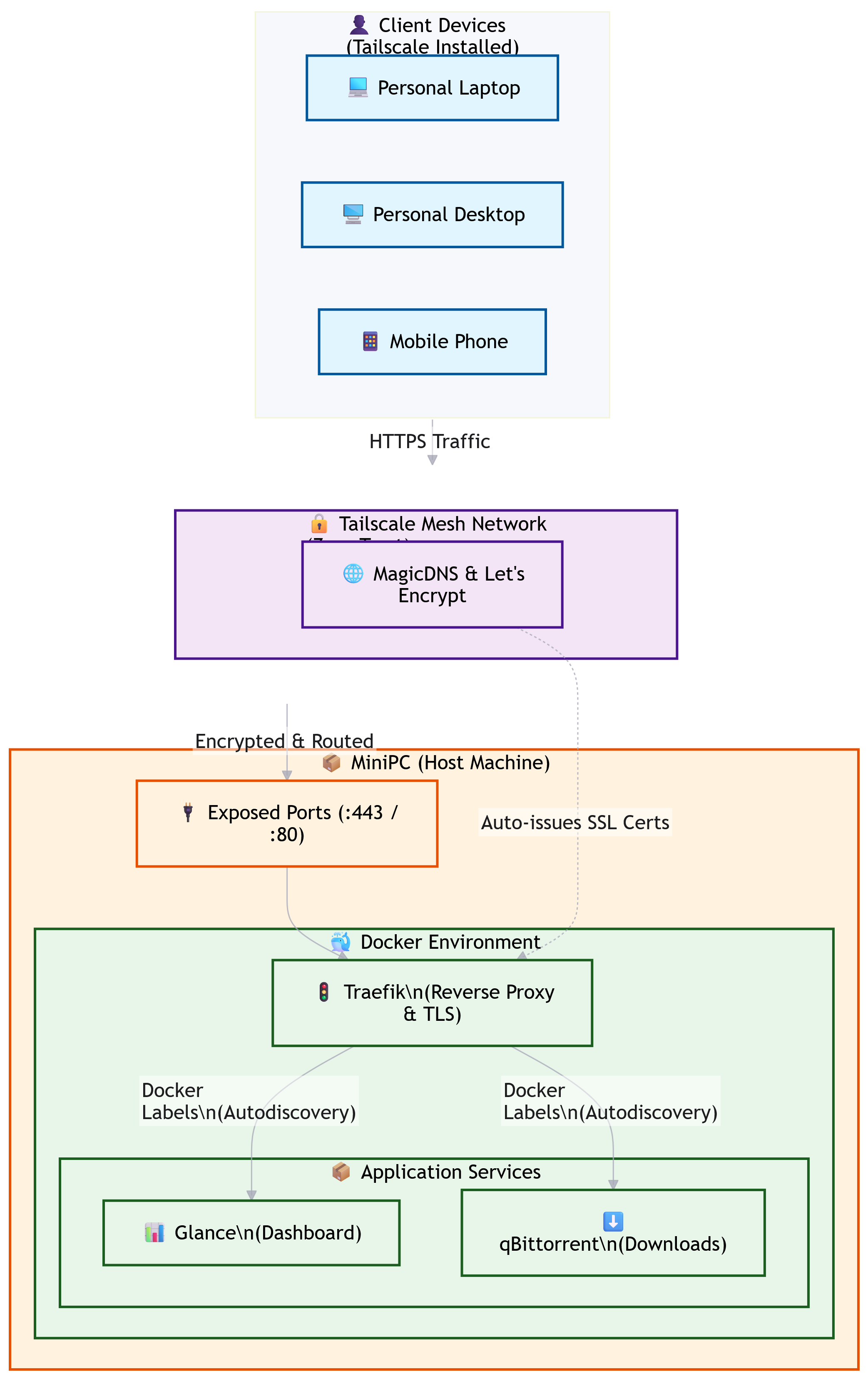
For a private VPN, the tailscale default plan is a great starting option. It allows you to add personal devices and manage your own VPN. Bazzite comes with tailscale out of the box, so it is only a handful of commands to get this running:
ujust enable-tailscale
sudo tailscale up  # Redirects to login online
Enabled Options: HTTPS (ssl certs)
Project: tailscale
Services
The services below are managed inside Podman containers with Quadlets. Podman Quadlets offers a declarative way to manage configuration and also has built-in systemd integration to manage container life-cycle. Each application service below is managed as a container.
traefik
I'd have various services running in the homelab and managing the routes for each one can become cumbersome. Project traefik offers a reverse proxy and load-balancer solution at enterprise scale to manage application networking. It offers service discoverability by allowing users to provide labelled configurations for their podman containers, and automatically register matching routes as per the label. This makes the networking management easily handled at each application level through simple container labels.
Project: traefik proxy
Config: minipc/traefik
Glance Dashboard
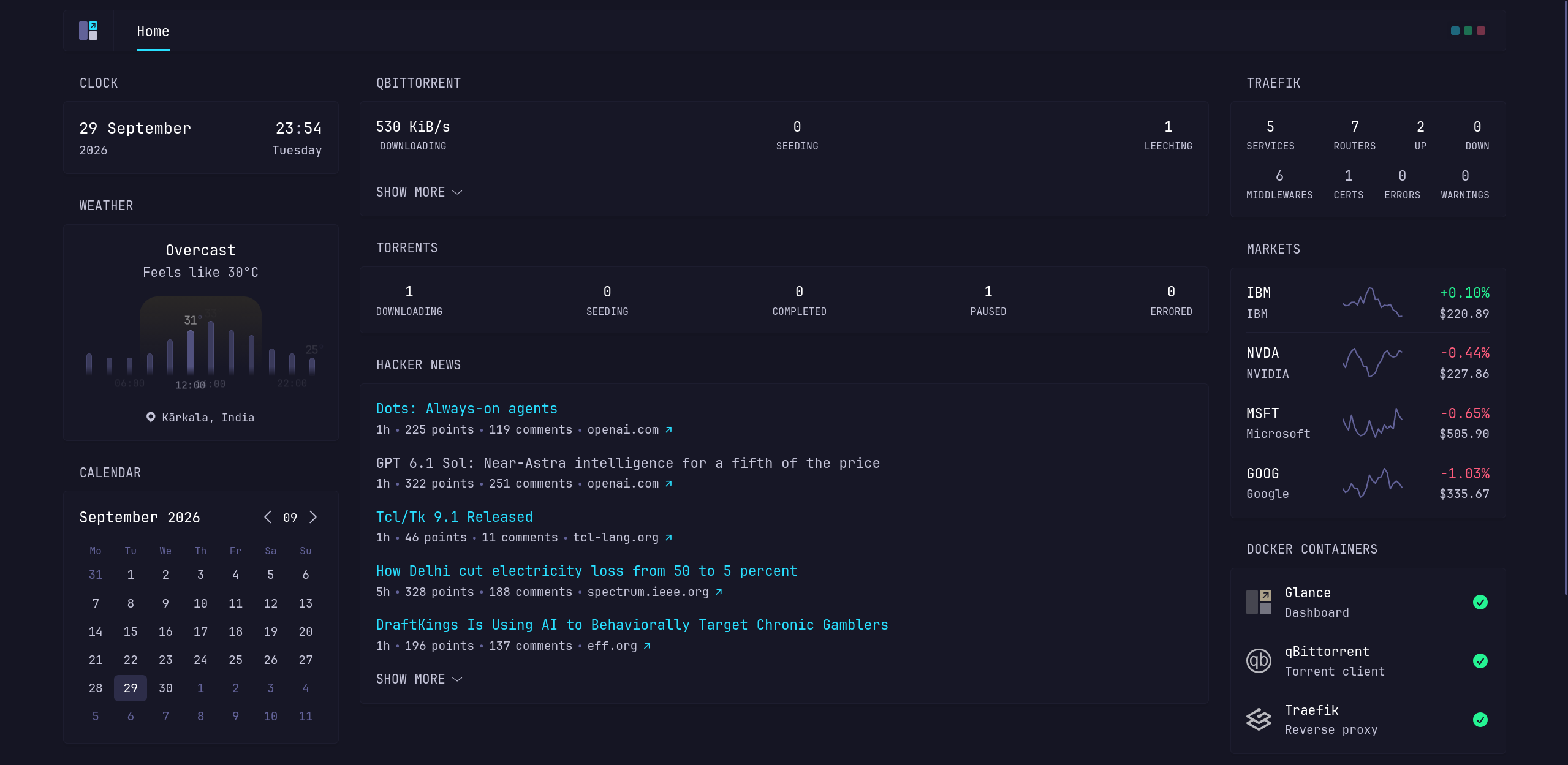
A homelab without a dashboard for a homepage is lacking, so this is where glance comes in. As the name suggests, the project lets you glance at all your feeds through a single dashboard. It is highly customizable, has a widget plugin ecosystem and is a minimalistic application.
Project: glance
Config: minipc/glance
QBittorrent
One of the main reasons for setting up a homelab was also to use it to torrent data without having to do it on my laptop or PC, which most of the time shuts down or sleeps thanks to Windows. By making this a Linux service, and also making it remotely accessible, I can download large data easily and then later transfer it internally over the LAN.
Bazzite uses CoW for most of its file system by default for its own optimization, but for the torrent use-case this can be a terrible option considering the multiple chunks of writes it has to manage during downloads. One of the things is to make sure to disable this in the download directory with this command:
chattr +C /path/to/dir
Config: minipc/qbittorrent
What's next?
- Running local LLMs/AI on CPU. With the current compute, it should be able to handle 3-5B model weights on CPU.
- External GPU for hosting larger models. This would depend on my luck to be able to acquire a large VRAM GPU in today's market (even used cards).
- Security: I have not delved much into securing systems in the past other than following some best practices for container and application level. But definitely want to ensure more hardening of OS security at the networking level.
- Kubernetes: While we have podman containers running on the system, a lightweight K8s with k3s could be interesting to try out.
Code: homelab